Five Age Groups. One Event. One Link for Every Parent.
A club cup with U8 to U14, a men's and a women's draw, an A and a B tier. How to run every division on its own terms without running five separate tournaments.
The short answer
A multi-division tournament is one event that runs several separate competitions at the same time, usually split by age group, gender or skill level. Each division has its own teams, format and winner. In LiveCup you create a Mega Tournament in separate leagues mode and add one tournament per division; parents, players and the venue TV then follow every division from a single link.
Who runs multi-division events
Youth clubs are the classic case: a spring cup for U8, U10, U12 and U14, where the eight-year-olds must never meet the fourteen-year-olds and every age group needs its own champion.
The same shape turns up everywhere else: a men's and a women's draw at a volleyball weekend, A and B tiers at a five-a-side league, an open and a recreational bracket at a pickleball day, or a company sports day with football in the morning and volleyball in the afternoon.
What these events share is the organiser's problem. The divisions are separate competitions, but it is still one day, one venue, one crowd and one person answering the question "where does my kid play next?"
Why separate tournaments do not work
The obvious approach is to create one tournament per age group in whatever tool you already use. It works until the event starts.
Parents get five links and open the wrong one. The registration form for U10 lives somewhere different from the one for U12. On the day, you jump between five admin panels to enter scores, and the screen in the clubhouse can only show one division at a time.
The alternative, cramming everyone into one big tournament with groups named after age groups, breaks the other way: one shared format, one shared points system and one overall winner that makes no sense when the teams never play each other.
How it works in LiveCup
A Mega Tournament is a container for your event. In separate leagues mode, every tournament inside it stays a complete, independent competition with its own teams, schedule, format and table. The Mega adds what the event needs on top: one public page, one TV screen and one place for you to run the day.
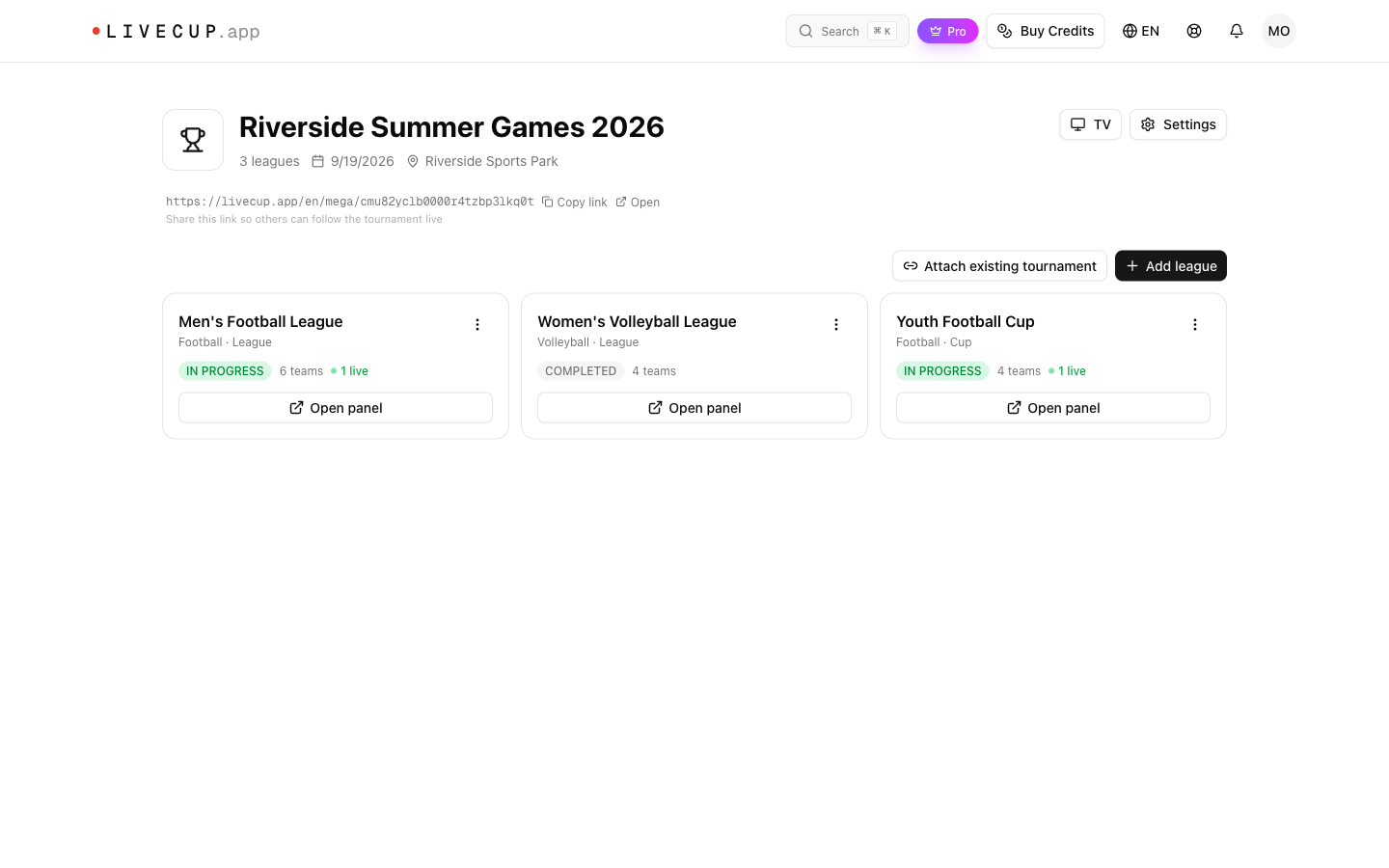
Setting up a multi-division event, step by step
- 1
Create the event
Create a Mega Tournament, give it the event name, date and venue, and choose separate leagues mode. Rename "league" to whatever your divisions are called, for example "Age group" or "Division".
- 2
Add one tournament per division
Each division is created with the same wizard as any LiveCup tournament, so it gets its own sport, format, team count and points system. Tournaments you have already set up can be attached instead.
- 3
Open registration per division
Every division has its own registration link and QR code. The event page also shows a register button where a team manager picks the right division first.
- 4
Share one link
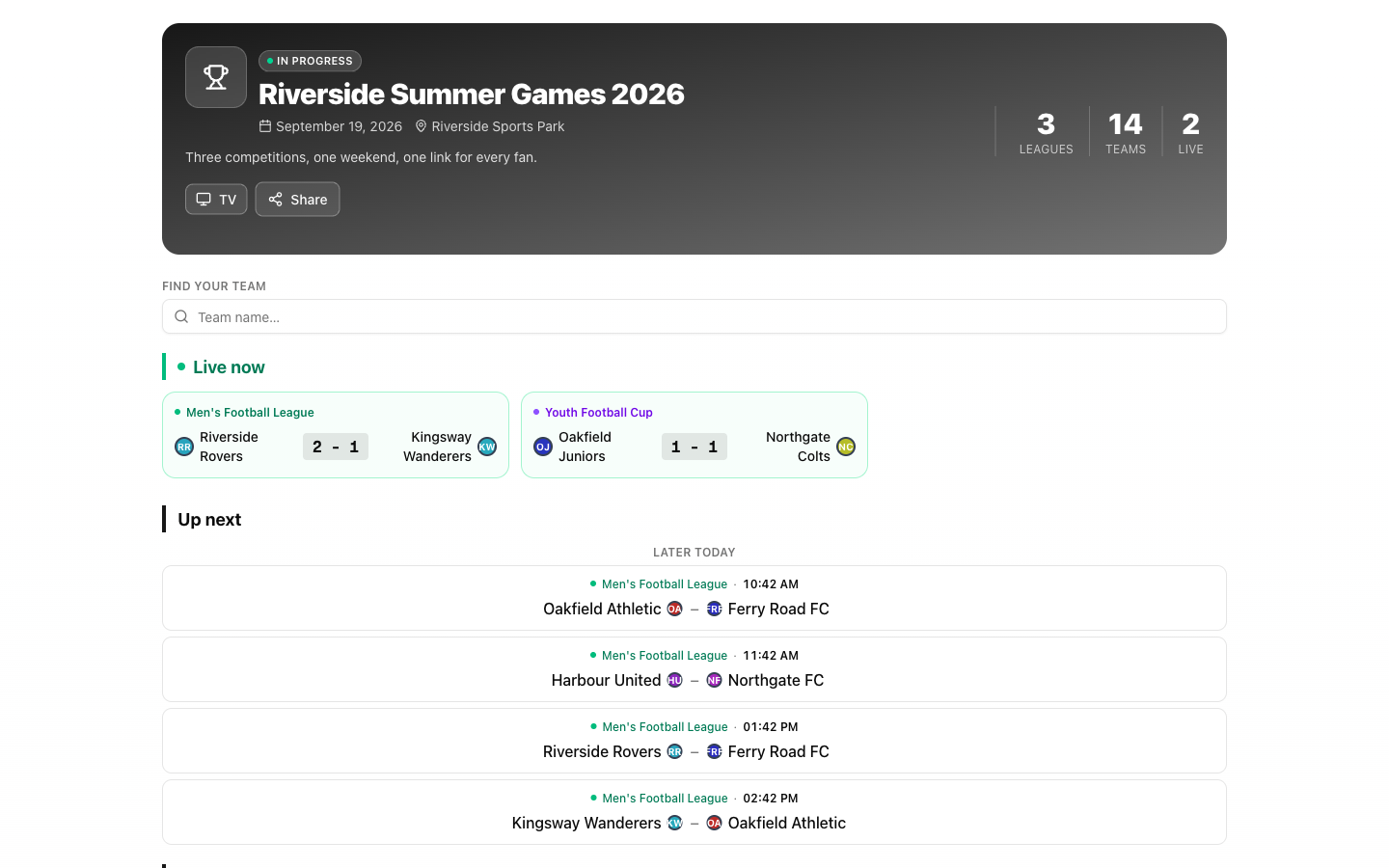
Send parents and players the event page. It shows what is live now and what is up next across every division, with a search by team name and each division's full table or bracket.
- 5
Run the day from one screen
Event control lists live, upcoming and recently finished matches from all divisions, so you record scores without opening each tournament. The venue TV rotates through the divisions you choose.
A different format for every age group
Divisions rarely have the same number of teams, and they should not have to share a format. The youngest group usually wants everyone to play everyone; the oldest group wants a real knockout. Here is a typical Saturday youth cup, with the match count for each division:
| Age group | Teams | Format | Matches |
|---|---|---|---|
| U8 | 5 | Round robin, everyone plays everyone | 10 |
| U10 | 8 | 2 groups of 4, top 2 to semi-finals | 15 |
| U12 | 12 | 4 groups of 3, top 2 to quarter-finals | 19 |
| U14 | 8 | Knockout cup | 7 |
That is 51 matches in four independent competitions. Each division gets the format that suits its size and age, and each one crowns its own champion.
Not sure how many matches a format produces for your team count? The tournament calculator shows it for every size from 4 to 32 teams.
Open the tournament calculatorWhat parents and players see
The public event page answers the only question a parent has on the day: where and when does my child play? It shows live scores from every division side by side, the next matches with their start times, and a search that finds a team by name.
Tapping a division opens its full table or bracket. When a division finishes, the page shows its champions, while the other age groups keep playing.
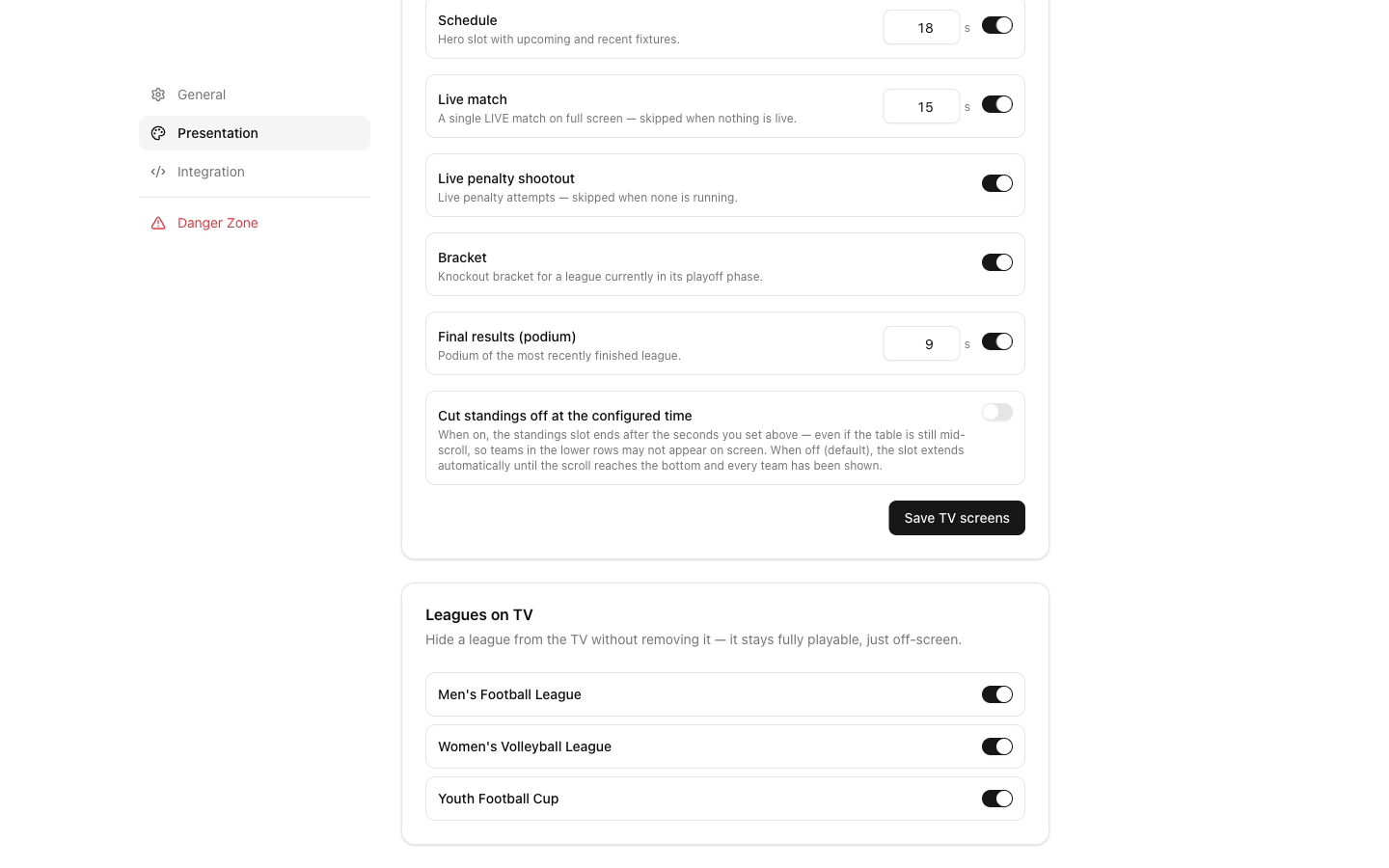
The screen in the clubhouse
The event TV mode rotates through the divisions: tables, brackets, live matches and results. You decide which divisions appear on the screen and which screen types are shown, so a finished age group can drop off while the others stay on.
The TV screen also carries a QR code to the event page, which saves you from answering "is there a link?" forty times.
Separate divisions or one overall ranking?
Separate leagues mode is right when divisions are truly independent, as age groups are: nobody adds up the U8 and U14 results.
Some events do want an overall winner. A club championship or a school sports day where the same teams play football, volleyball and relay, and every placing earns points for a house or a club, fits combined mode instead. There the Mega keeps one shared pool of teams and adds up placing points from each competition into an overall table.
The mode is chosen when you create the event and is fixed once the first tournament is added, so decide before you start: independent champions per division, or one ranking across everything.
What to plan outside the software
Each division keeps its own schedule. LiveCup does not share pitches between divisions or warn you when two age groups are booked on the same pitch at the same time, so give each division its own pitches or its own time block.
Helpers are added per division. A coach who enters scores for U10 is added to the U10 tournament, and the cross-division event control screen is for the event owner.
Mega Tournaments are part of the PRO plan and above. Each division then runs with the owner's plan, so team limits of the free plan do not apply to them.
Frequently asked questions
What is a multi-division tournament?
One event that runs several separate competitions at the same time, split by age group, gender, skill level or sport. Each division has its own teams, format and champion, while the event shares a venue, a date and usually one audience.
Can each age group use a different format?
Yes. Every division is a full tournament, so U8 can play a round robin while U14 plays a knockout cup. Sport, team count and points system can also differ between divisions.
Do parents need a separate link for each age group?
No. The event page shows every division, with live scores, the next matches and a search by team name. Each division's own table and bracket are one tap away.
How do teams register for the right division?
Each division has its own registration link and QR code, and the event page has a register button where the team manager chooses the division before signing up.
Can I add a tournament I already created to the event?
Yes. Existing tournaments can be attached to the event instead of being created again, as long as they are not drafts, not archived and not already part of another event.
Does LiveCup schedule pitches across all divisions?
No. Each division has its own schedule, and there is no check for two divisions using the same pitch at the same time. Plan by giving each division its own pitches or time blocks.
Which plan do I need for a multi-division event?
Creating a Mega Tournament requires the PRO plan or above. The divisions inside it run with the owner's plan.
Related Articles
Three Competitions. One Link.
Separate leagues mode turns one event into as many independent tournaments as you need — with one public page where fans follow all of them live.
Tap the Team. That Is the Whole Interaction.
Event control shows every live and upcoming match across all the leagues in your event, and records a goal in one tap without leaving the page.
Group Stage + Knockout Tournament Generator: Run Your Own World Cup
The complete guide to the most popular tournament format on the planet — how groups work, who advances, how the bracket is seeded, and how to generate the whole thing in minutes.
Run your next cup as one event
Create the event, add one tournament per age group, and send parents a single link.
Create a multi-division event