LiveCup.app keeps the score of a darts match for you. It counts down the remaining points, knows busts and suggests the checkout. You set the rules once for the whole tournament.
The darts scorer is free on every plan.
Set the darts rules
Open your tournament and click Settings, then General. You can also set them in the creation wizard.
Find the Darts rules card. On a phone, Settings is in the three dots menu (More actions) at the top of the tournament page.
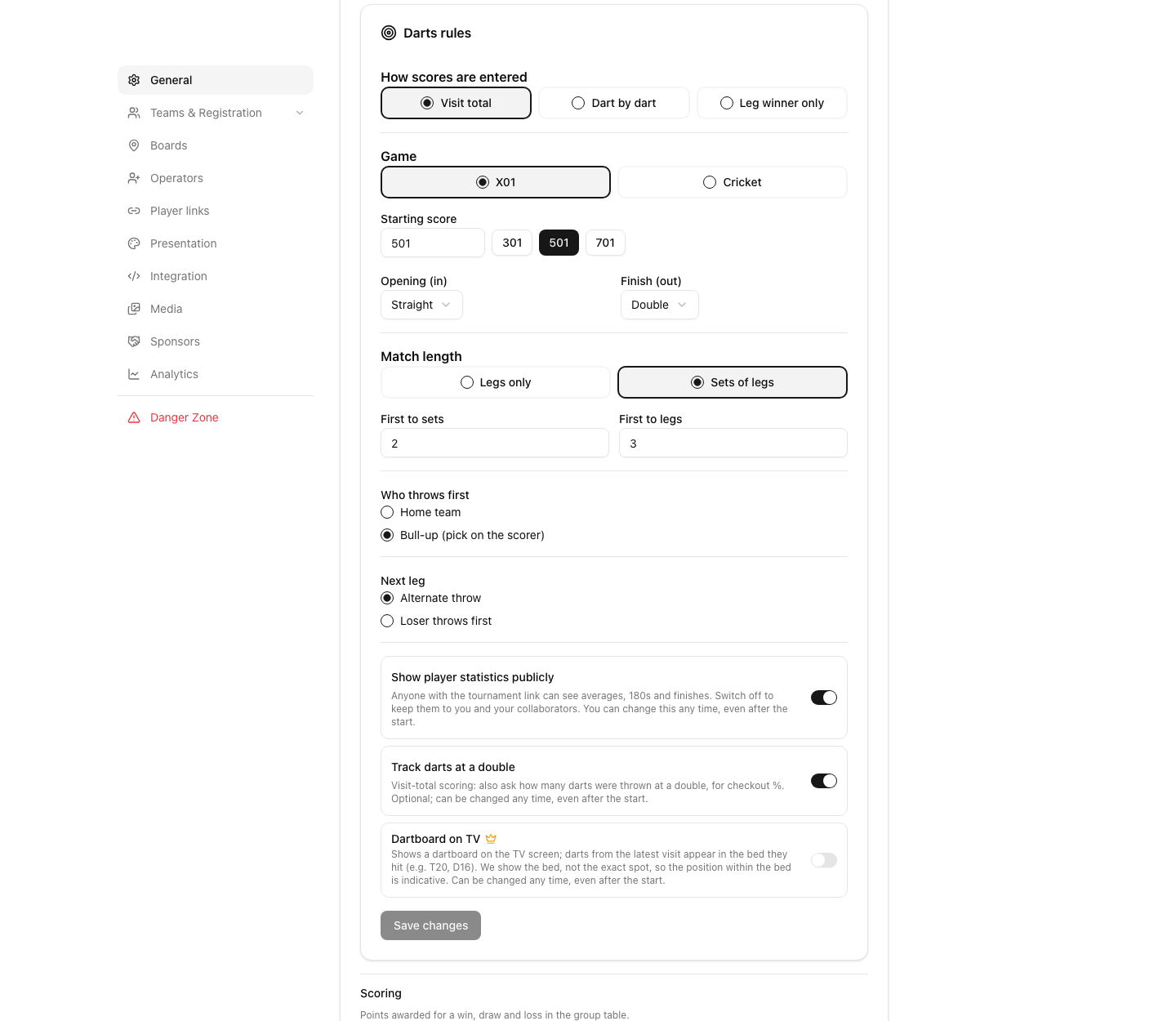
Under How scores are entered, choose the way your markers will work: Visit total, Dart by dart or Leg winner only. See below.
Under Game, pick X01 or Cricket.
For X01, set the Starting score. Tap 301, 501 or 701, or type any number from 101 to 1001. Then choose Opening (in) and Finish (out): Straight, Double or Master.
Under Match length, choose Legs only (set First to legs) or Sets of legs (set First to sets and First to legs).
Under Who throws first, pick Home team or Bull-up (pick on the scorer).
Under Next leg, pick Alternate throw or Loser throws first.
Click Save changes at the bottom of the card.
For Cricket you can set a Round limit. Then the leg goes to the player with more points, or more marks if points are level.
Does your tournament have a knockout stage and do you want other rules there? Switch on Different rules for knockout matches and set them there.
After you start the tournament, the game and the match length are locked. A few switches stay open, for example how the scores are entered, Show player statistics publicly and Dartboard on TV.
Three ways to enter scores
Visit total: you type what the player scored with three darts. It is the fastest way and the default.
Dart by dart: you tap every dart (single, double or treble, then the number, Bull or Miss). Choose this if you want exact checks for Double opening, or the dartboard on the TV.
Leg winner only: you only mark who won each leg. There are no points and no statistics. See below.
Cricket is always scored dart by dart. A marker can change the way on their own screen with the Visit total / Dart by dart / Legs only switch above the keypad. They can apply it to this match only or to the whole tournament.
Score a match
Open the match from the tournament page and click Start Match. Click it again on the match screen.
If you chose a bull-up, pick the winner under Who won the bull?
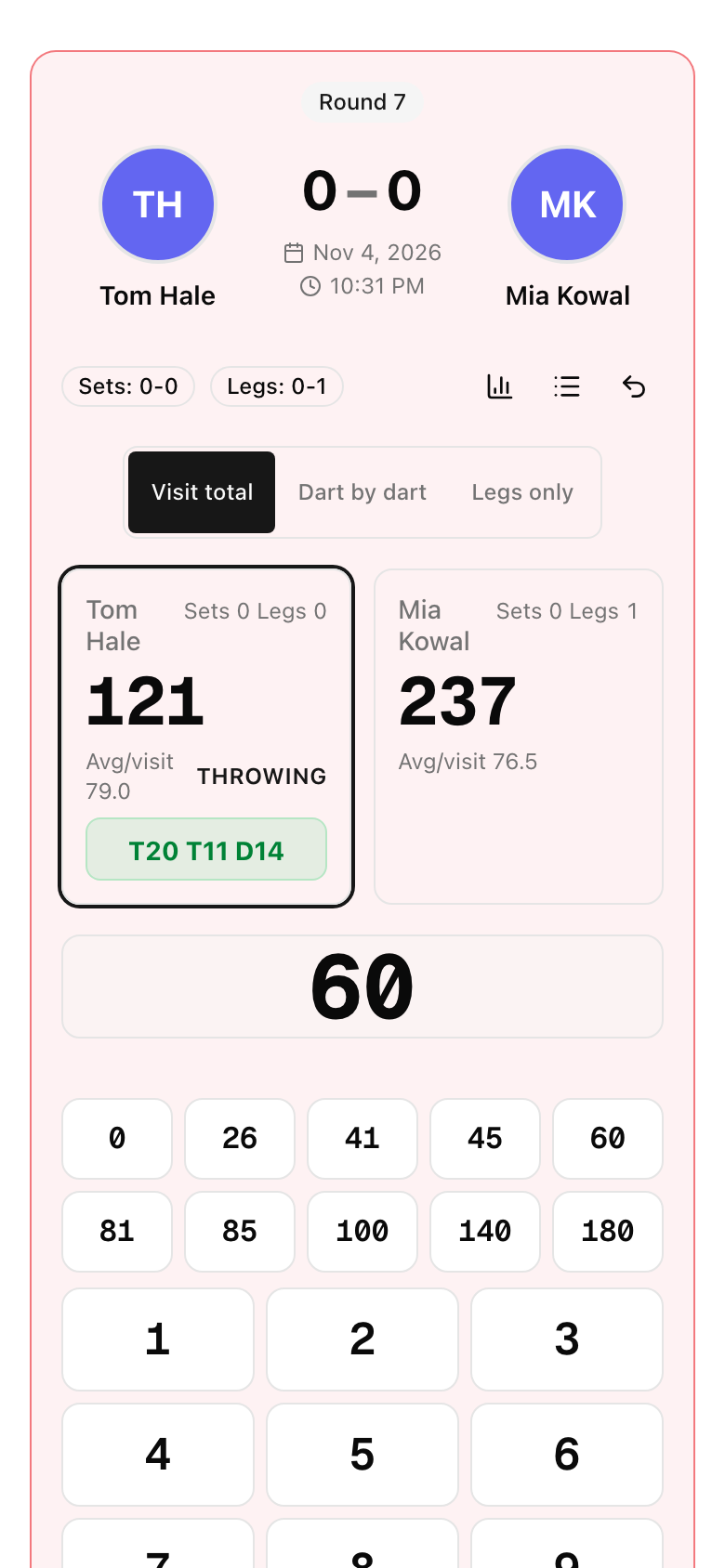
The keypad shows the player on throw and the points left. Tap a quick score (26, 41, 45, 60, 81, 85, 100, 140, 180, or 0 for no score) or type the total and press Save. On a computer, Enter saves and Backspace deletes a digit.
When a player can finish, a Suggested checkout appears above the score, for example T20 T19 D20.
Keep entering visits. The turn changes by itself.
What LiveCup.app does for you:
A total that three darts cannot make (like 179) or more than 180 is blocked.
A visit that goes below zero, or to a score that cannot be finished, is a Bust. The score goes back and the turn passes. The keypad asks Save 0.
When a visit finishes a leg, the next leg starts. If the checkout can be done with more than one count of darts, a window asks "how many darts?". Tap 1, 2 or 3. This feeds the checkout and best-leg statistics.
After the last leg, the winner banner shows and you click End Match.
Fix a mistake
Undo: removes the last visit. Use it as many times as you need.
Tap the history icon (Show history) to open the Visit log, then tap an earlier visit to correct its score. LiveCup.app refuses a change that would break the later visits.
Two people scoring the same match? The app shows the latest score and tells you that the score was updated on another device.
No signal? Visits wait on the phone (you see Offline) and are sent when the connection is back.
Cricket
The Cricket board shows 20 to 15 and Bull. For every dart, tap the single, double or treble button of the number you hit, or Miss. Each dart appears as a chip. Tap a chip to remove it. After the darts, press Submit visit. Marks, closed numbers and points are counted for you.
Legs only: the fastest mode
Choose Leg winner only when you do not need statistics, for example on a busy evening. The scorer shows a button Leg: player for each player. Tap the winner after each leg. Undo last leg takes it back. If you only know the result, click Enter final score instead before the first leg, set the legs of each player and click Save score.
Who can score
You and your co-organisers, see co-organisers.
A referee with a link, see referee mode.
Players themselves, from a personal link, see darts statistics, boards and player links.
Fans can follow the leg-by-leg score on a public match page, and the TV shows it live. See the TV display.