Use a walkover when a team does not play one match. Use a withdrawal when a team leaves the whole tournament after it has started. Both are free and both ask you to confirm twice, so a wrong tap does nothing.
Walkover, result or reset?
Walkover. The team did not show up, left during the match, had too few players or was disqualified. The match ends without being played on the pitch. LiveCup.app marks it W.O.
Normal result. The match was played to the end. Type the score as usual. See how to enter scores.
Reset. You entered the wrong thing and want the match back as not played. See how to fix a result.
Only the organiser, co-organisers who can manage matches and teams, and LiveCup.app admins can give a walkover or withdraw a team. A referee cannot. See referee mode.
Give a walkover for one match
Open your tournament. You are on the Schedule tab.
At the end of the row of a match that has not started, click the button with three dots and choose Walkover.
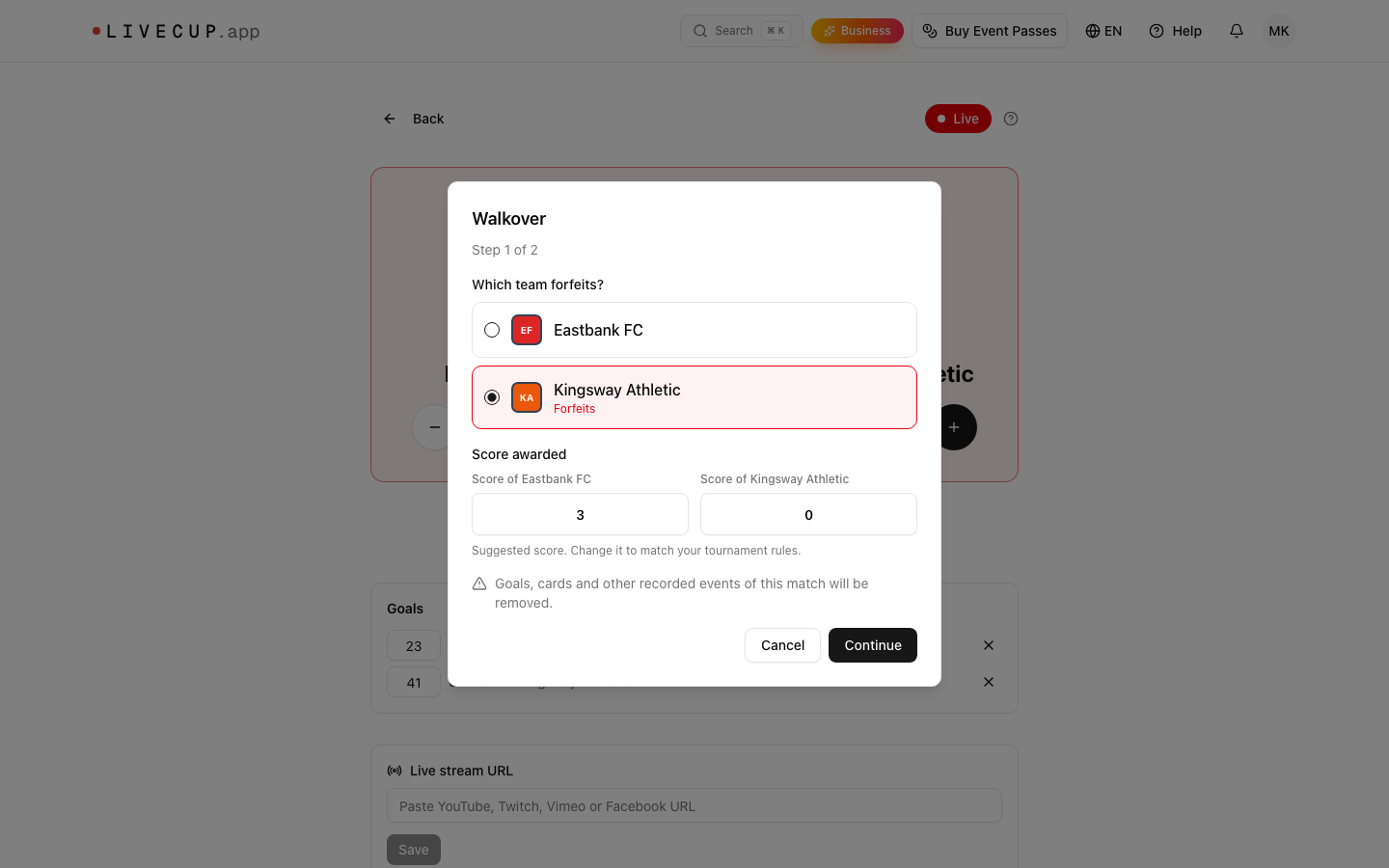
Under "Which team forfeits?", click the team that does not play. It is marked Forfeits.
Check the numbers under Score awarded. Change them if your rules say so.
Click Continue.
Read the sentence on the screen. For example: "Wisła Płock Akademia wins 3:0 by walkover. Polonia Warszawa U12 forfeits." Click Confirm walkover.
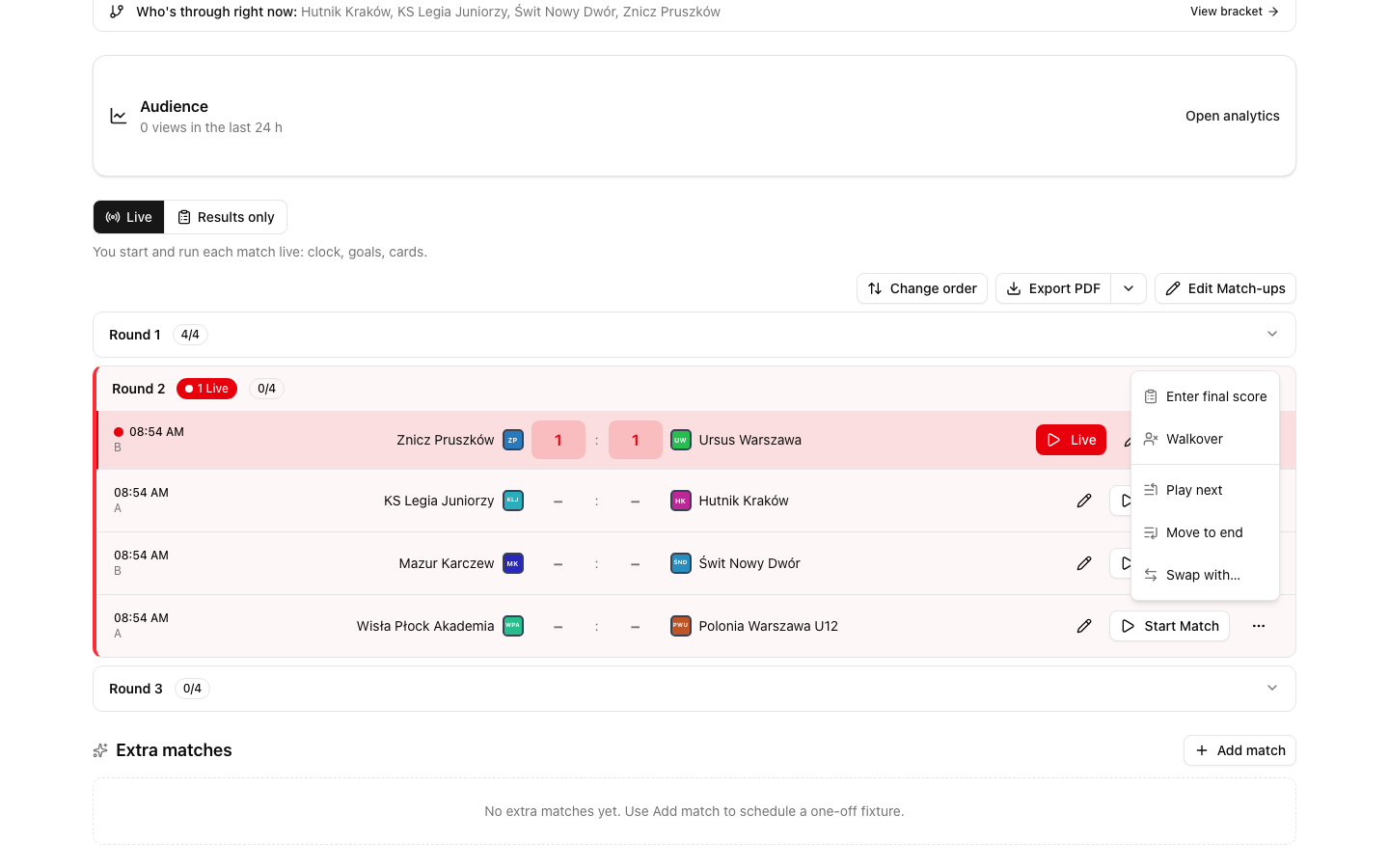
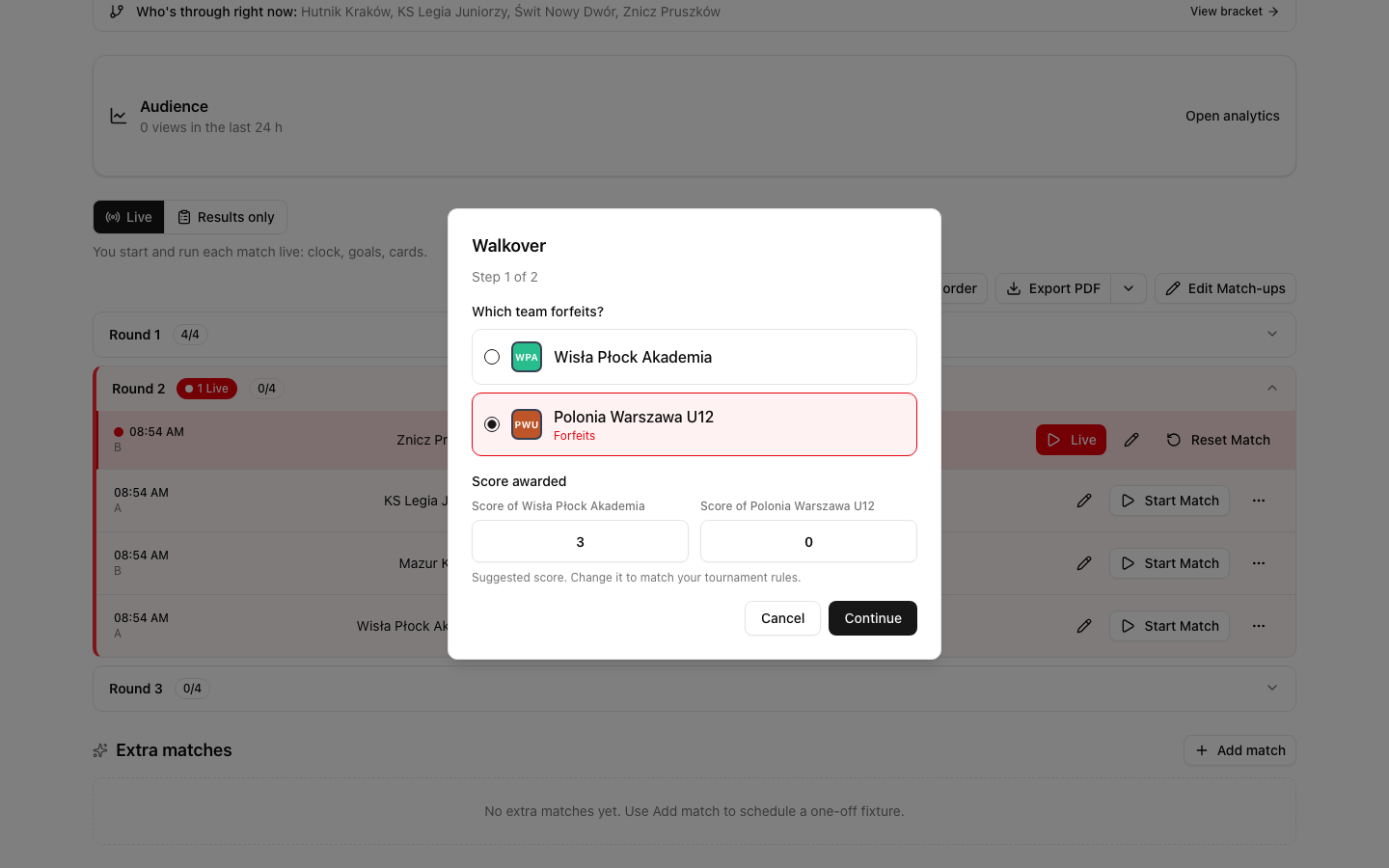
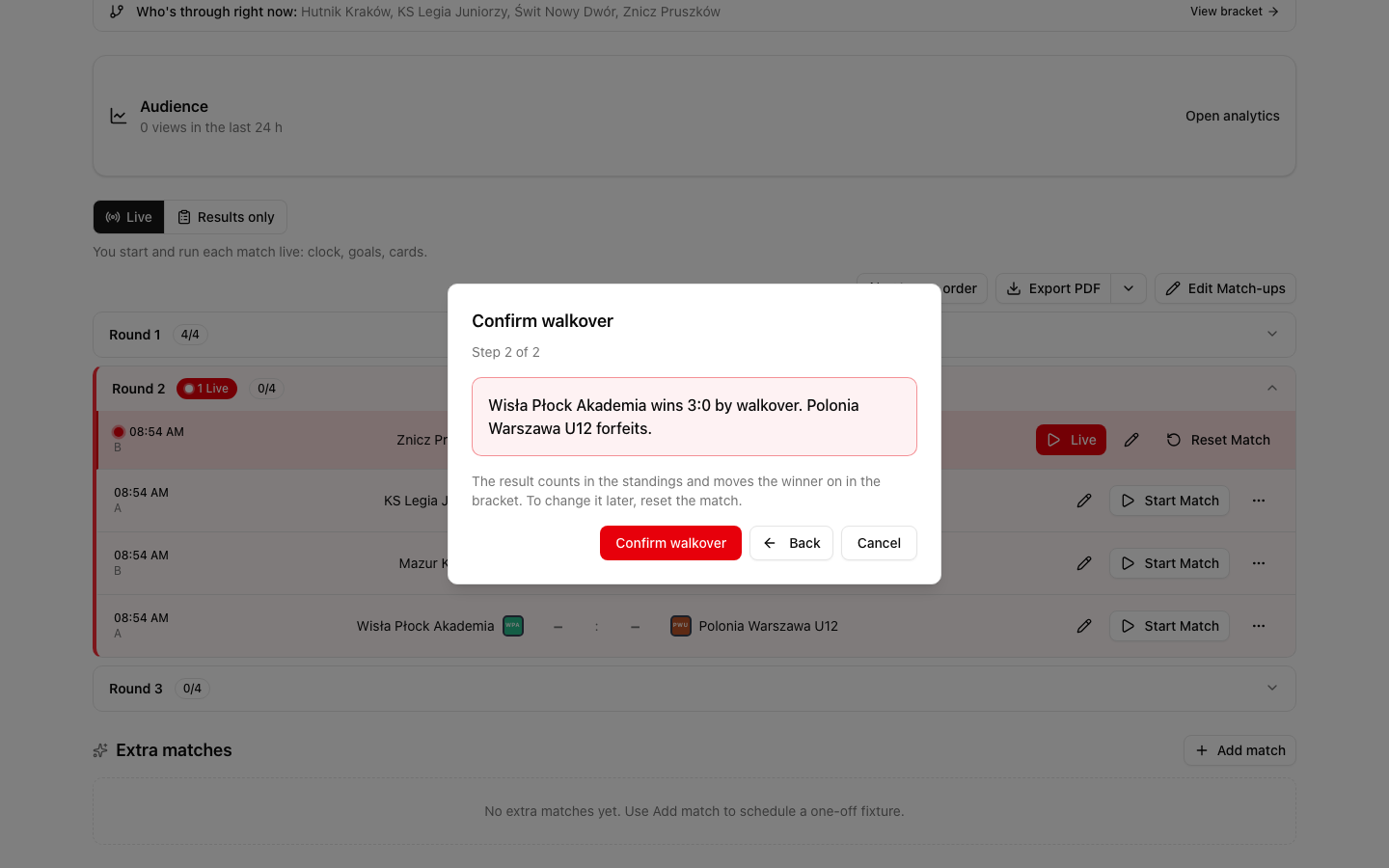
Nothing is saved until you click Confirm walkover. Back returns to step 1. Cancel closes the window and changes nothing.
Why there are two steps
Step 1 is the choice: who forfeits and with which score. Step 2 is the summary in one sentence, so you can see who wins before anything is saved.
The window protects you from a stray click or tap:
The red Confirm walkover button is not where Continue was. If you tap twice in the same place, you hit Cancel, not the confirmation.
The buttons of step 2 stay grey for a moment (less than a second). A fast double click does nothing.
Pressing Enter in step 1 never confirms step 2.
Three places to give a walkover
Live mode, a match that has not started. The three dots menu at the end of the row, as above.
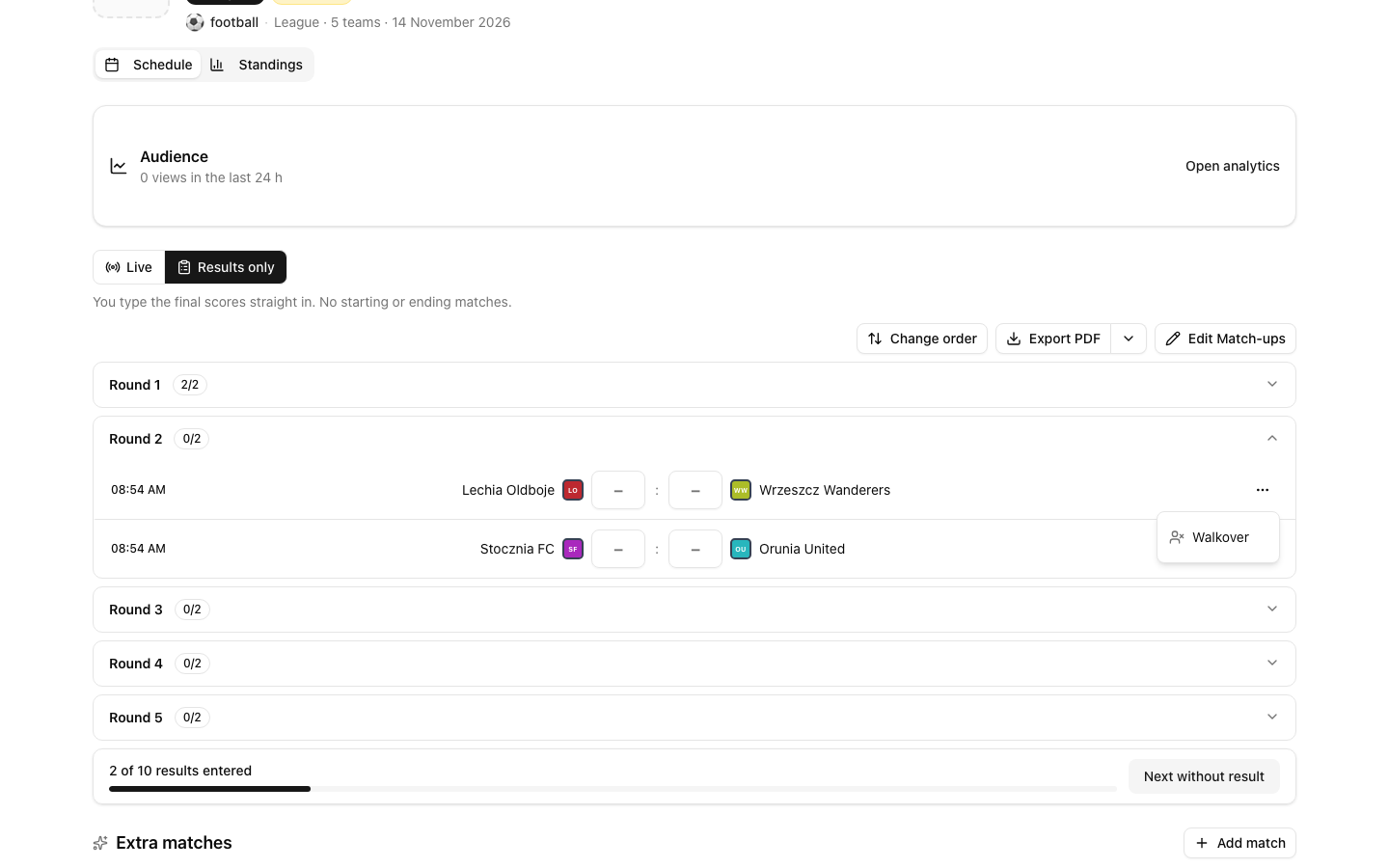
Results only mode. The three dots menu at the end of a row that has no result yet. The window is the same. See Results only mode. This mode is not offered for every sport, so in volleyball or tennis use Live.
A match that is running now. Open the match and click Walkover under the score. The window tells you that goals, cards and other events of this match will be removed.
Both teams must be known. A match where one team is not decided yet has no walkover. A free slot in a bracket (a bye) has none either.
The suggested score
LiveCup.app fills in a score. It is only a suggestion. Change it to match the rules of your tournament. The winner must have more than the team that forfeits, so a walkover never ends level, also in a group.
| Sport | Suggested score | | --- | --- | | Football, futsal, e-football | 3:0 | | Basketball | 20:0 | | Handball | 10:0 | | Floorball, ice hockey, field hockey, water polo | 5:0 | | Sports played in sets (volleyball, beach volleyball, tennis, padel, badminton, table tennis and others) | The sets needed to win in your sets format, to 0. For example 2:0 in a best of three, 3:0 in a best of five | | Darts | The legs needed to win, to 0 (sets, if you play in sets) | | All other sports, rugby included | 1:0 |
How the score works in sports with sets:
The team that forfeits always has 0 sets. You cannot change that.
The winner gets at least 1 set and at most the number of sets in your format. In a best of three that is 1 or 2. With a fixed number of sets, it is up to all of them.
Every set is saved with the winning points to 0: 25:0, 25:0 in volleyball, 21:0 in beach volleyball and badminton, 11:0 in table tennis, 6:0 in tennis and padel. If your tournament has its own points per set (for example 21), LiveCup.app uses them. In sports where a set is only won or lost, a set is saved as 1:0. More in set scoring.
What happens when you confirm
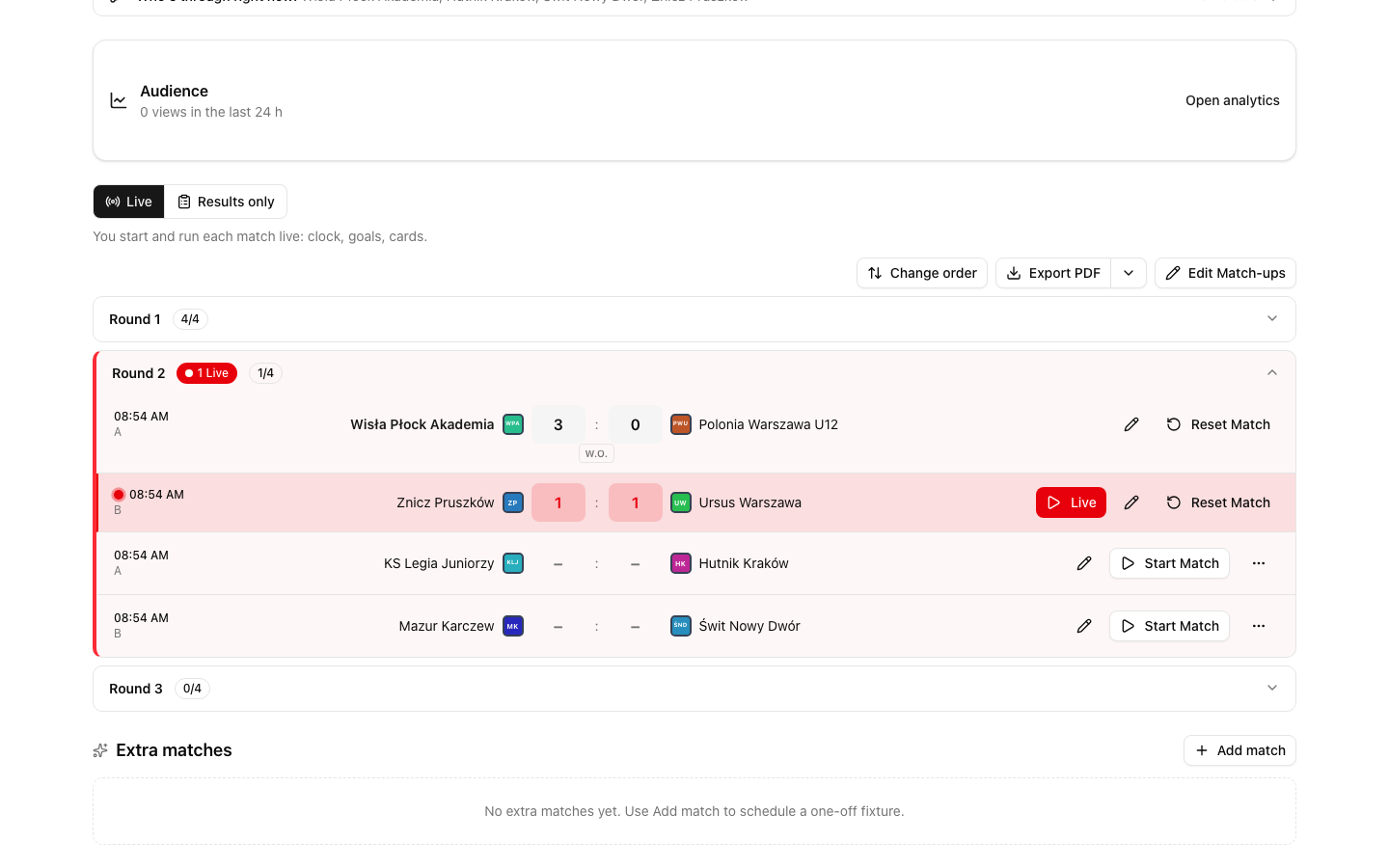
The match is finished. The score shows the W.O. badge.
The table. The walkover counts like a normal result: points, goals (or sets) for and against. LiveCup.app gives no bonus for it: no rugby bonus points and no points for overtime or a shoot-out. See how the standings are ordered.
Recorded events are removed. Goals, cards and other events of that match are deleted. They no longer count for top scorers. A walkover replaces what happened on the pitch.
The bracket. In a knockout match the winner moves on to the next round at once, as after a played match.
The W.O. badge appears next to the score in:
the schedule in the operator panel,
the public page: match rows, the bracket, the match page and the team page,
the TV display and the embed widget,
PDF exports,
the stream scoreboard (the final result card).
Undo a walkover
Click Reset Match next to the score. In Results only the button is Reset result. The match goes back to not played, and the table no longer counts it.
Then you can give a walkover again or enter a normal score. This is useful when the team arrives late and the match is played after all.
A walkover that comes from a team withdrawal cannot be reset. The team stays withdrawn, so those matches stay decided. Only walkovers you gave yourself, for a team that has not withdrawn, can be reset.
Edit Score is not offered for a walkover. The score and the walkover belong together, so reset the match and enter the result again.
The events that the walkover removed do not come back.
In a knockout bracket the winner leaves the next round again. If the next round has already been played, the reset is refused, as for every result. See how to fix a result.
Withdraw a team during the tournament
Open your tournament and click Settings.
Click Teams & Registration.
Find the Teams card. Click Withdraw team next to the team. On a phone you see only the icon.
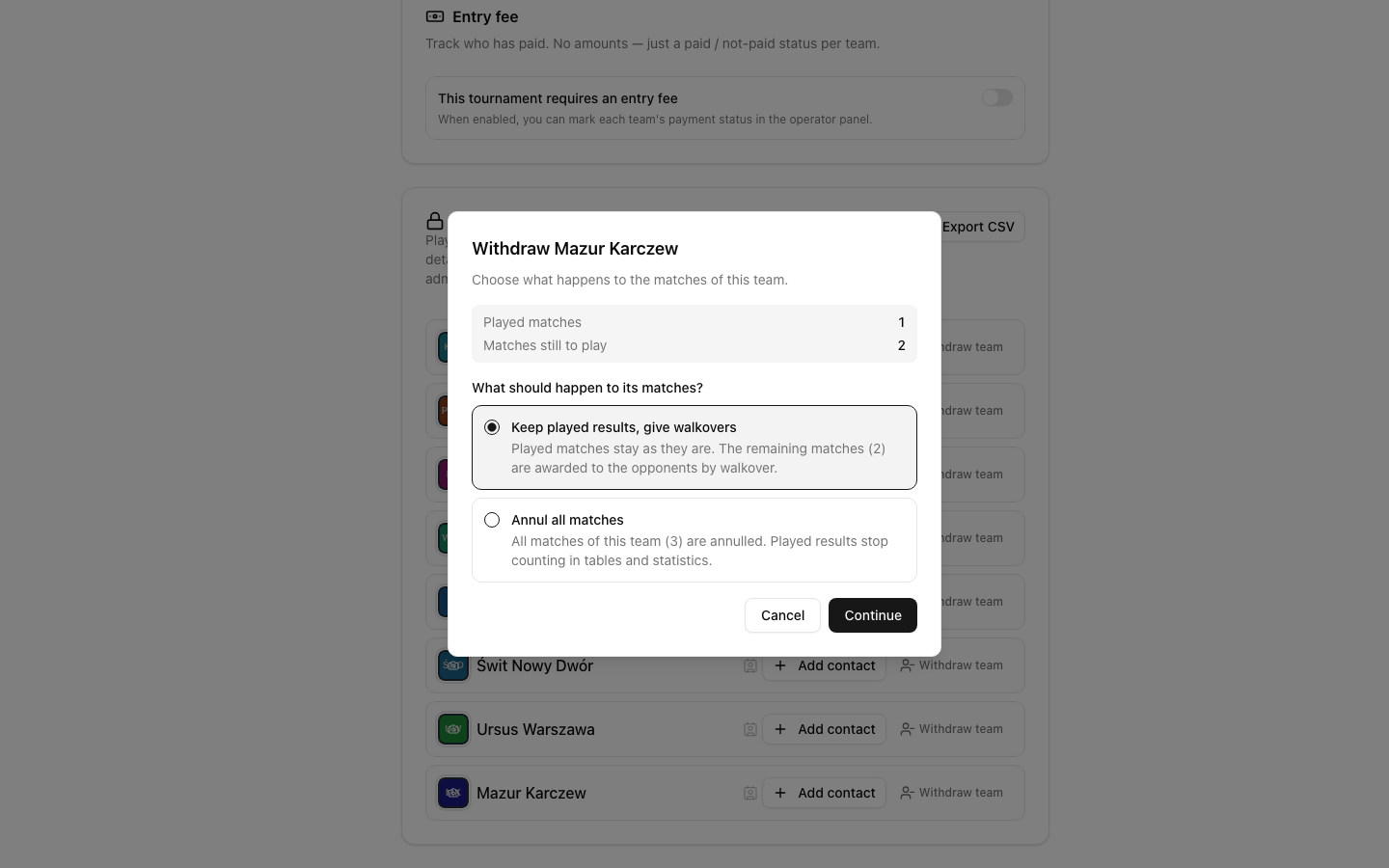
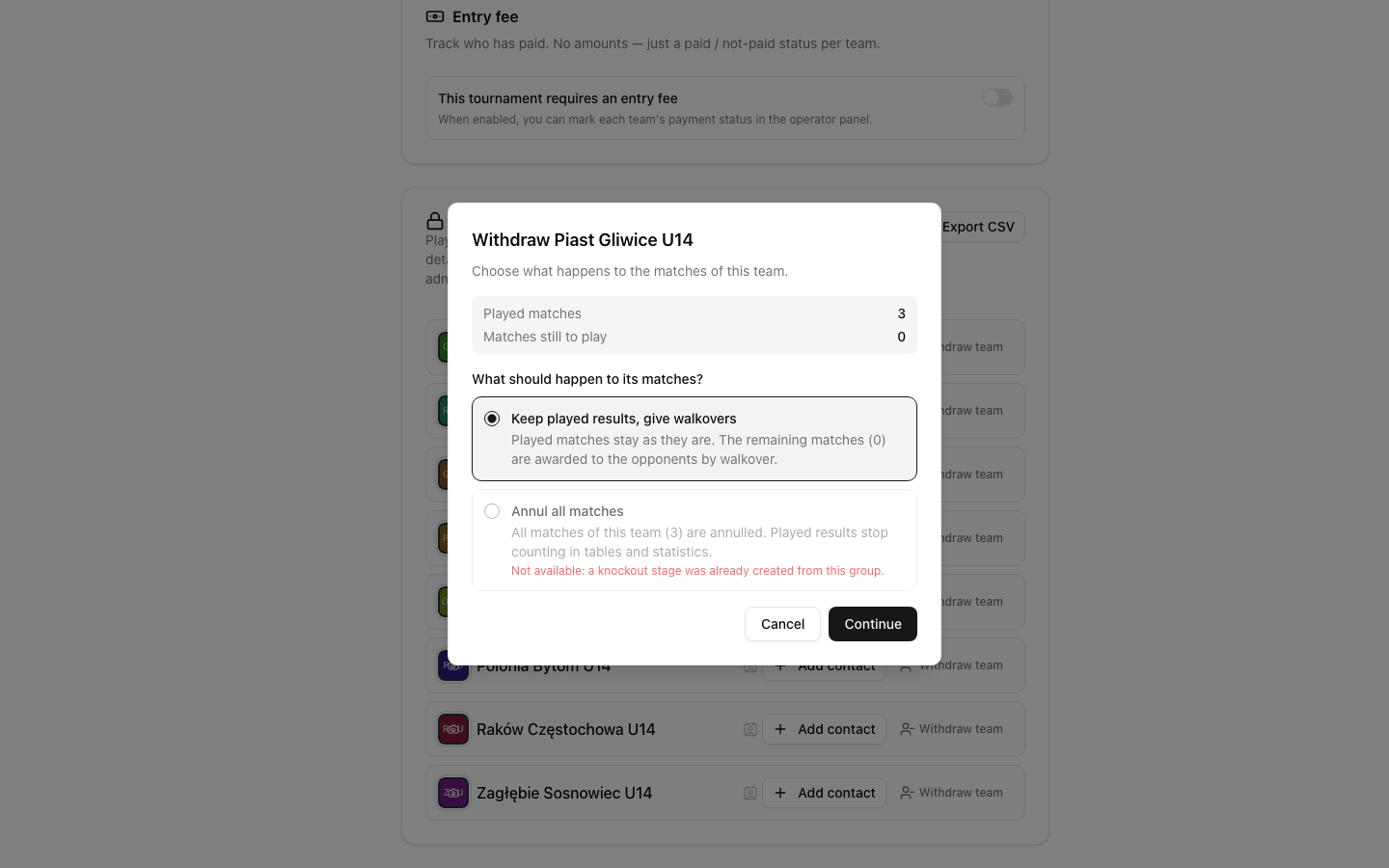
The window shows two numbers: Played matches and Matches still to play. A third line, In progress now, appears when a match of this team is running. Choose what happens to the matches (see below). Click Continue.
On the screen Last check, read the summary. Tick I understand this cannot be undone.
Click Withdraw team.
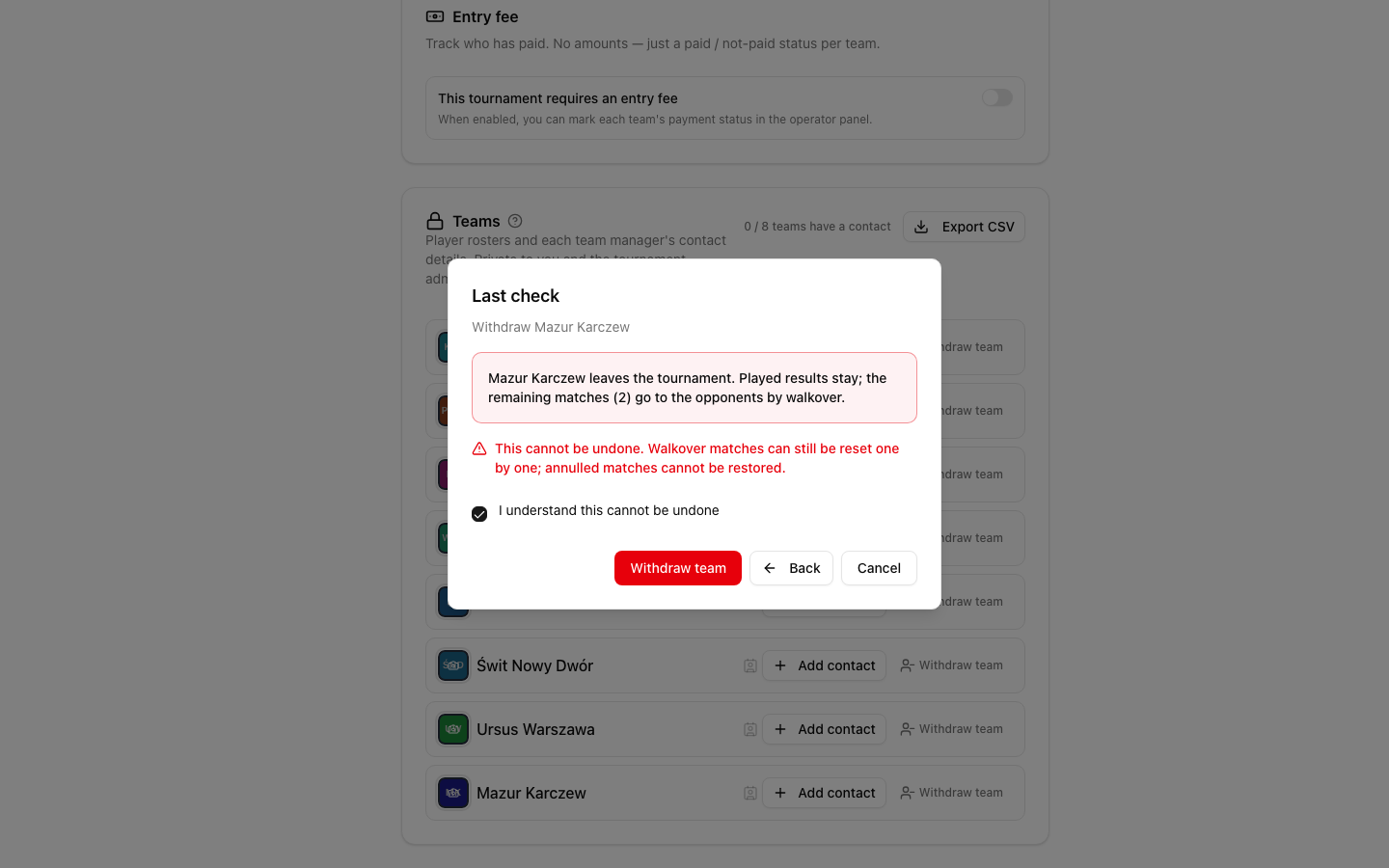
The red button stays grey until you tick the box. Back and Cancel are always there. Nothing changes before the last click.
If the team has a match that is running now, it counts among the matches still to play.
Option 1: Keep played results, give walkovers
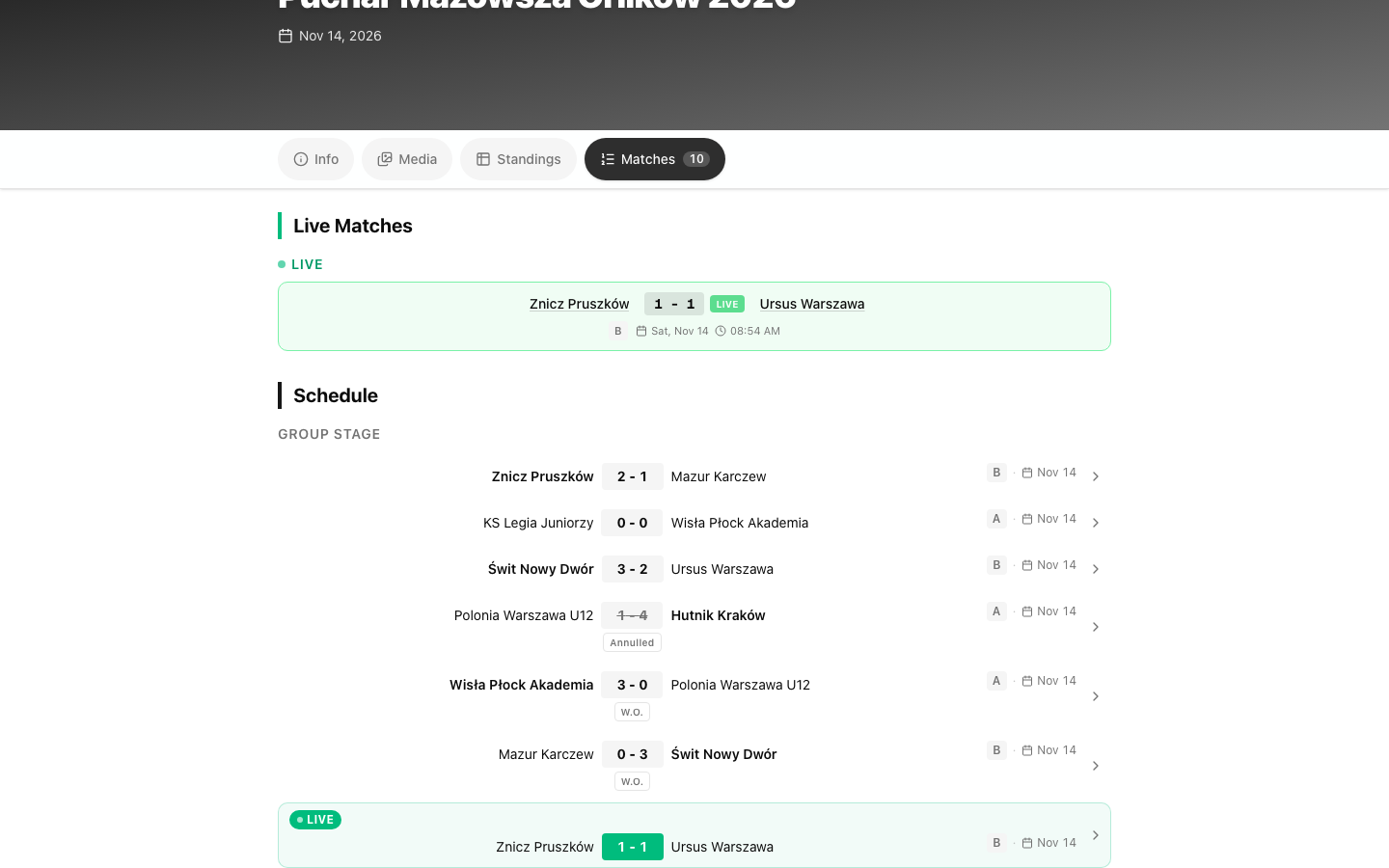
Played matches stay as they are. Every match still to play goes to the opponent by walkover, with the suggested score. The team keeps its played matches in the table, and it also gets the lost walkovers.
Example. Group A has four teams: A, B, C, D. Team D withdraws after one of its three matches. In football, a win gives 3 points. The match B–C is still to be played.
Before the withdrawal:
| Team | Played | Goals | Points | | --- | --- | --- | --- | | A | 2 | 3:0 | 6 | | D | 1 | 1:1 | 1 | | C | 2 | 1:2 | 1 | | B | 1 | 0:2 | 0 |
D has drawn with C (1:1). A and B have not played D yet. After Keep played results, give walkovers, the matches B–D and A–D end 3:0 for B and for A:
| Team | Played | Goals | Points | | --- | --- | --- | --- | | A | 3 | 6:0 | 9 | | B | 2 | 3:2 | 3 | | C | 2 | 1:2 | 1 | | D (withdrawn) | 3 | 1:7 | 1 |
D has the same points as C, but it is listed last and has the Withdrawn badge. Its draw with C stays.
Option 2: Annul all matches
All matches of the team stop counting, also the ones already played. It is as if the team had never been in the group.
Matches already played stay visible on the public page and in the schedule. They are struck through and marked Annulled. They count nowhere: not in the table, not in top scorers, not in statistics.
Matches not yet played disappear from the schedule.
Same example, with Annul all matches: the match C–D (1:1) is annulled, and the matches B–D and A–D are removed.
| Team | Played | Goals | Points | | --- | --- | --- | --- | | A | 2 | 3:0 | 6 | | C | 1 | 0:1 | 0 | | B | 1 | 0:2 | 0 | | D (withdrawn) | 0 | 0:0 | 0 |
C loses the point from the draw with D. The table counts only the matches between the teams that stayed.
Which one should I choose?
A common rule: annul when the team has played less than half of its matches, give walkovers when it has played half or more. In the example D played 1 of 3, so annulling is the usual choice.
The reason: with only a few matches played, the results of the team decide too much about who is ahead. With many matches played, the opponents would lose points they have already earned.
Your own regulations decide. If they say what to do with a team that leaves, follow them. LiveCup.app only gives you both ways.
Annulling is not always possible:
It is offered only in a league and in the group stage of a tournament with groups.
It is not offered once the knockout phase has been generated from the group. The window shows the reason under the option, and you can still give walkovers.
It is not offered in a cup, in double elimination or in the Swiss system.
If you compare teams from different groups (for example the best third places), an annulled group counts as smaller: it has one team and some matches less. Check that this is fair under your rules before you move to the knockout phase.
A team that is already in the bracket
In a cup, in double elimination and in the knockout phase there is no table, so only walkovers are possible.
The match of the withdrawn team that is waiting to be played goes to its opponent by walkover. The opponent moves on at once.
If the next opponent of the team is not known yet, you do nothing. As soon as the opponent is known, LiveCup.app gives that match to it by walkover.
Matches already played keep their results.
Swiss system
A withdrawn team is not paired in the next rounds. Its match in the current round, if it has not been played, is given to the opponent by walkover.
What others see
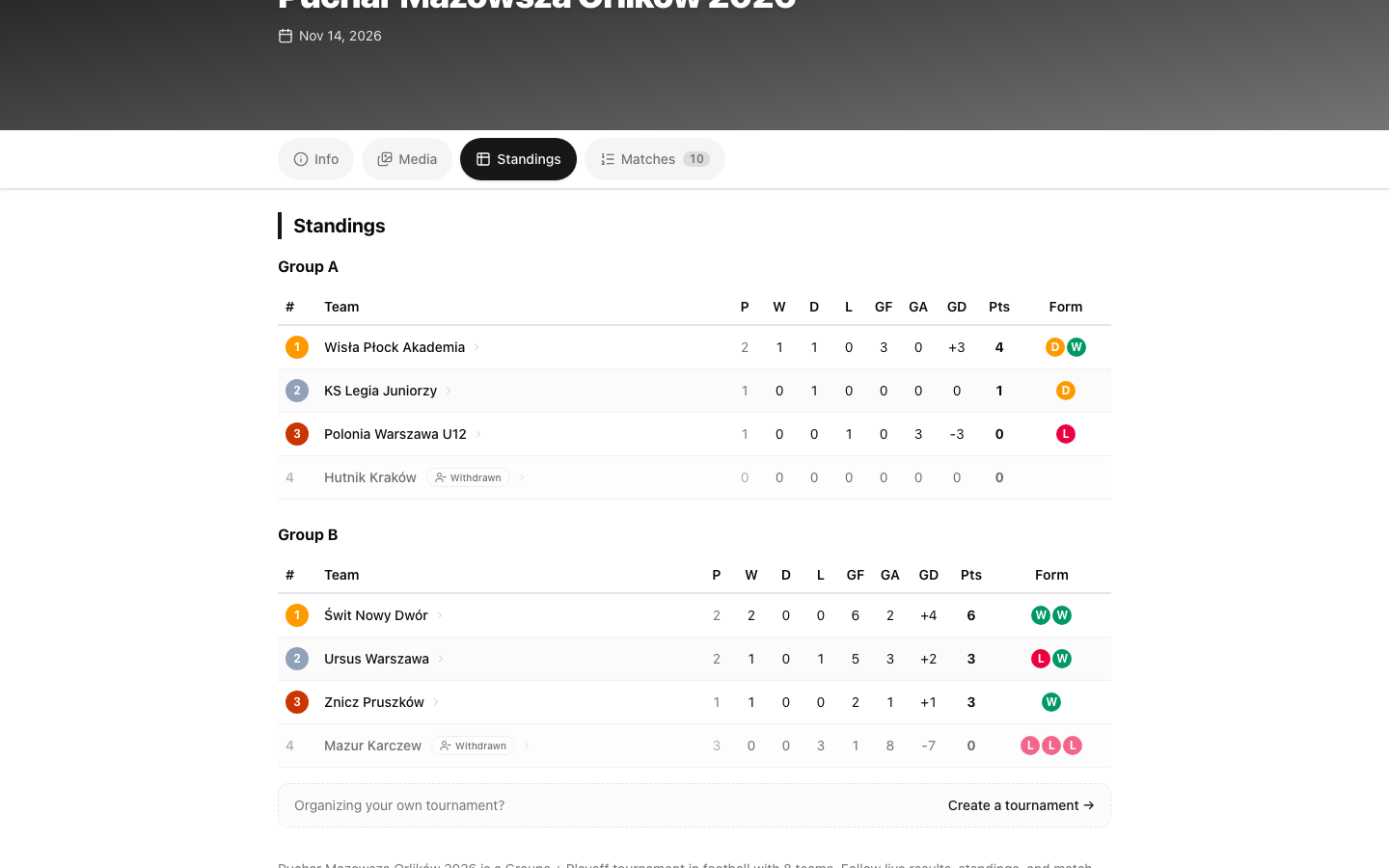
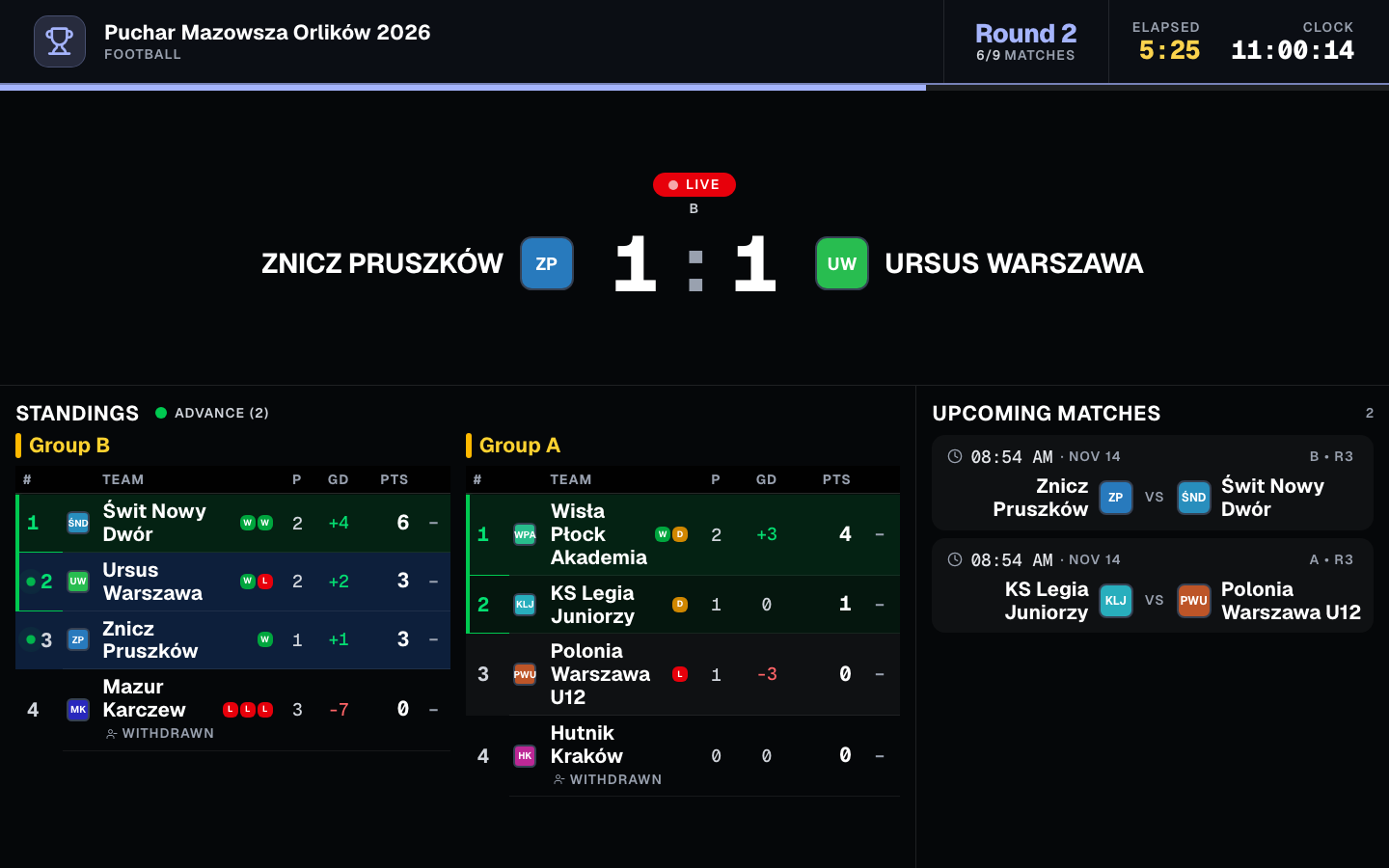
The withdrawn team is listed last in its table, whatever its points, with the Withdrawn badge. This is also so on the TV display, in the embed widget and in PDF exports.
It never advances to the knockout phase. The next team in the table advances in its place.
Walkovers show W.O. everywhere, and annulled matches show Annulled where they are shown at all.
What "cannot be undone" means
A withdrawal cannot be reversed. There is no button to bring the team back.
Walkovers you give yourself can be reset, one by one, with Reset Match. Walkovers awarded by a withdrawal cannot be reset.
Matches removed by an annulment do not come back. This is also true after you reset the whole tournament. Annulled matches that were played stay annulled.
If you are not sure, choose Keep played results, give walkovers. Played results stay as they are, but the walkovers it awards cannot be reset.
When it does not work
The tournament has not started. Use the group draw screen: Withdraw from group…. See groups setup and live group draw.
The tournament is finished. Walkovers and withdrawals are not available. Reopen the tournament first.
Americano and Mexicano. There is no walkover and no withdrawal. Use the roster changes instead. See Americano and Mexicano.
Darts and cornhole with a scoring log. A match with recorded legs or innings must be reset first. In a withdrawal, the walkover option shows how many matches are blocked, and nothing is changed until you reset them.
The knockout stage already exists. Group results are locked, so a walkover in a group match is refused. See how to fix a result.
You are a referee. The button is not shown to you.
The team is already withdrawn. It has no Withdraw team button any more.
Questions
Can a walkover end in a draw?
No. The winner must have a higher score than the team that forfeits. If your rules say that both teams lose, enter the match as a normal result.
Can I change the score of a walkover?
Not directly. Click Reset Match and give the walkover again with the score you want.
The team came after all. What now?
Click Reset Match on the walkover. The match is not played again by itself, so play it and enter the result. If the next round has already been played, the reset is refused. This does not work for a walkover that comes from a team withdrawal: that team stays withdrawn.
Do goals and cards of a walkover match count?
No. Goals, cards and other events of the match are removed when you confirm, so they do not count for top scorers or statistics.
Does a walkover give bonus points?
No. In rugby there are no try or losing bonus points, and no points for overtime or a shoot-out. The winner gets the points of a win.
Can I bring a withdrawn team back?
No. The team stays withdrawn, and the walkovers the withdrawal awarded cannot be reset. If you annulled its matches, the removed ones are gone.
Does it cost anything?
No. Walkovers and withdrawals are free on every plan.